
The first draft sets the editing cost
When people compare subtitling tools, they usually compare editors. In our own production at Linearis, the editor mattered less than what arrived in it. A specialist working from a clean, well-timed transcript moves through an episode steadily, checking and adjusting. The same specialist working from a weak draft stops every few lines to retype a name, rebuild a subtitle or find where the speech actually starts.
A weak draft turns review into rewriting, and rewriting is the most expensive work in the chain because only a specialist can do it. That is why the first pass gets so much of our attention, and why I want to be specific about what produces it.

- 01 / CONTEXTTerms
- 02 / ENGINETranscribe
- 03 / TIMINGClean up
- 04 / REVIEWEdit
The models behind the draft
People ask what sits behind the draft. The honest answer has two parts: the models, and what we do around their output.
Transcription runs on ElevenLabs Scribe v2, which became our transcription engine in March 2026 because it was more accurate than the engine we used before. It covers 99 languages, detects the source language automatically and supports mixed-language content when the language is set to auto-detect. Subtitle translation and transcript re-alignment use OpenAI and Google Gemini models. These providers are named in our privacy policy as the processors for those functions.
What matters is how a model handles the material a subtitling team actually receives: interviews with overlapping speakers, presenters with strong accents, specialist vocabulary and music under the dialogue. That is the test I would apply to any engine, ours included. A model that does well on clean read speech and poorly on a noisy location interview will cost a production team time on exactly the files where time is shortest.
“A good model gives you the words. Subtitling needs the words, the timing and the structure.”
Lauris Zemturis, founder of clipsubs
The media layer on top
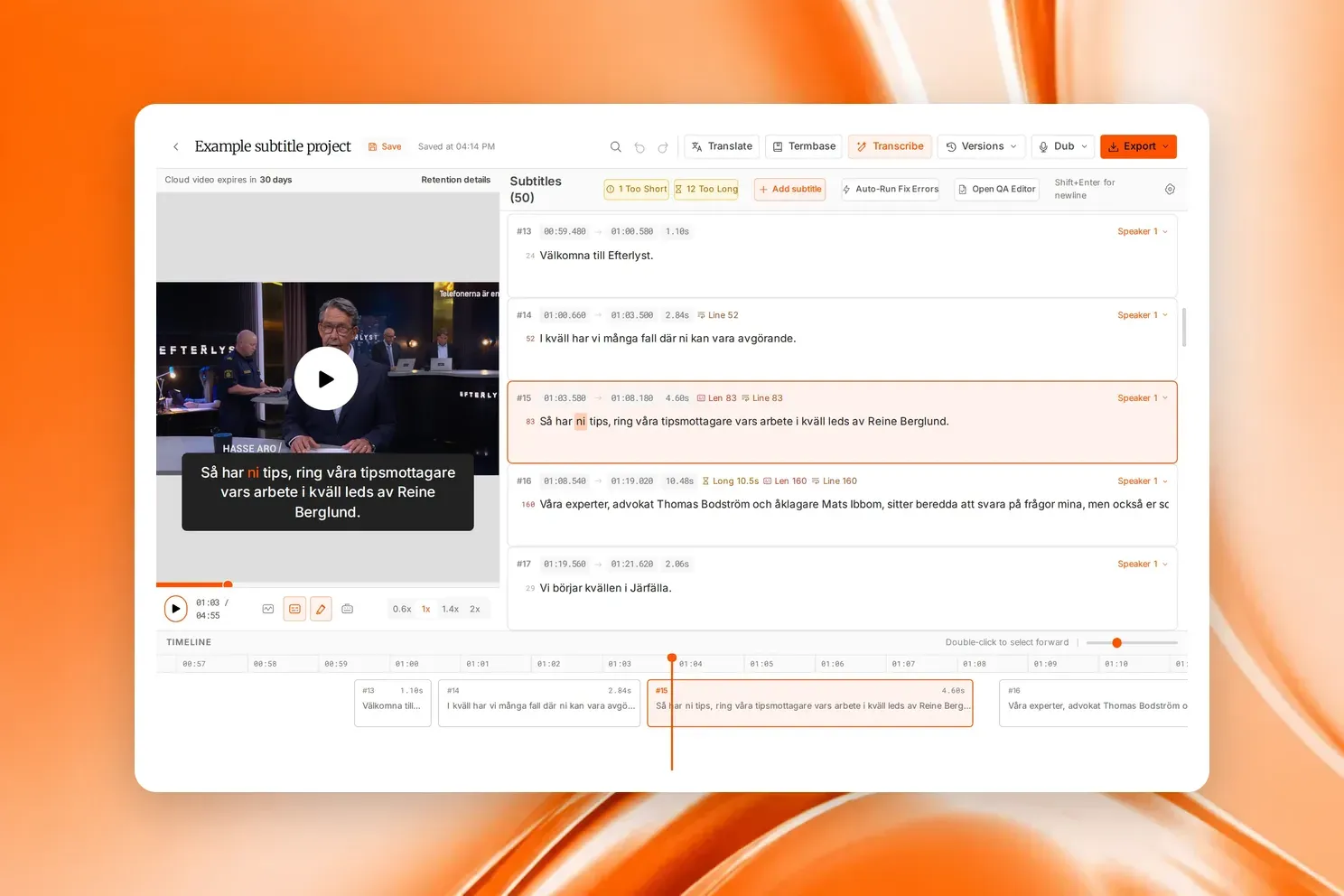
The second part is what happens around the model output. A raw transcript is a stream of text. A subtitle draft is something else: short units of text, each with a start and an end, broken into lines a viewer can read in the time available. The work between the two is where most of the editing cost used to sit.
The first part is word-level timing. Every word in the clipsubs draft is tied to the moment it is spoken, which is why the editor can highlight each word during playback, and why subtitle boundaries can sit close to the speech rather than drifting across a pause. The second part is automatic timing cleanup, which tidies the boundaries the raw output produces. The third is smart line breaking, which splits the text into subtitles and lines at sensible points rather than wherever a character limit runs out.
Together, these turn a transcript into a draft a specialist can review. They also feed the QC step: when the structure is already close to the brief’s limits, the eight adjustable checks flag the exceptions rather than half the file.
Names and terms before the first pass
The errors that cost the most review time are not the hard passages. They are the same name spelled wrongly forty times, or a technical term heard as a common word in every episode of a series.
Project termbases deal with that before transcription starts. A termbase holds names, brands and specialist vocabulary, up to 100 terms per list, and every file in a project that has one assigned uses it as context for transcription. Specialists can add terms from the editor with a keyboard shortcut when they meet a new name, so the next file in the series benefits. Termbases can also be shared across the organisation, which helps when the same presenters, places and brands recur across several projects for one client. Termbases guide transcription only; they are not applied to translation, so for translated versions the terminology still needs a specialist’s check.
Repairing a draft instead of restarting it
Sometimes the draft is mostly right and one part is not. A section of speech may be missing, or an imported subtitle file may have drifted out of sync with the audio. Starting again would throw away everything that was correct.
Transcribe gap fills in speech that is missing from the subtitle track, transcribing only the empty space between two subtitles. The specialist reviews the inserted text and timing in context and continues editing the same version. For an existing SRT that no longer matches the audio, AI Resync retimes the track, adds missed speech and removes subtitles that do not match the audio. It uses AI hours at 0.3× the source duration, so an hour of media uses 18 minutes. Where the words are fine but the structure needs to follow a different spec, Re-split rebuilds the lines using your character, reading-speed and duration limits, and it is free.
For Resync and Re-split, the original version is kept, so the specialist can compare the repaired result with what was there before.
Honest limits
The output is a draft. However good the models are, a person who knows the language has to check names, meaning, timing and readability before anything is delivered. Our privacy policy says the same: AI-generated transcripts, translations and timing require human review before use.
Speakers are labelled manually today. You can assign a speaker to any subtitle in the editor, but automatic speaker labels and automatic sound tags for SDH are still coming soon. If your delivery needs speaker identification, plan for that work in the review, and budget the specialist time for it rather than assuming the draft will carry it. The same goes for sound descriptions in an SDH track: the specialist adds them, and the Formatting check flags stray brackets and punctuation afterwards.
Mixed-language audio deserves particular attention. Auto-detect handles material with more than one language, but those passages are where a reviewer should look first, because a switch between languages is where any transcription engine is most likely to stumble.
“We would rather tell you where the draft needs a person than pretend it does not.”
Lauris Zemturis, founder of clipsubs
Before you judge a transcript
- Test it on your own material, with your usual speakers and sound.
- Add the names and terms to a termbase before the first pass.
- Count how many lines the specialist rewrites, not just corrects.
- Check timing and line breaks, not only the words.
What happens to your content
Customer content is not used to train the platform’s own AI models. We instruct our subprocessors not to use your content to train AI models beyond what is strictly needed to deliver your request, and the providers relevant to your service are available on request.
Videos are deleted automatically after 30 days, and each file shows its retention date. Subtitle versions are kept, so the transcript, its corrections and every language version stay with the project after the media has gone. If you need the source video for your own records, export it before the retention date.
If you want to see what a better first pass is worth in your own work, run one real file through it. New accounts include 30 free minutes, with no card required. Look at the draft the way your specialist would, and count the lines they would have to rewrite.