PRODUCT / SUBTITLE STUDIO
Your browser-based subtitling studio.
For teams delivering video in multiple languages. Transcribe, edit, translate and check subtitles in one workspace, then assign specialists and share the right version for review.

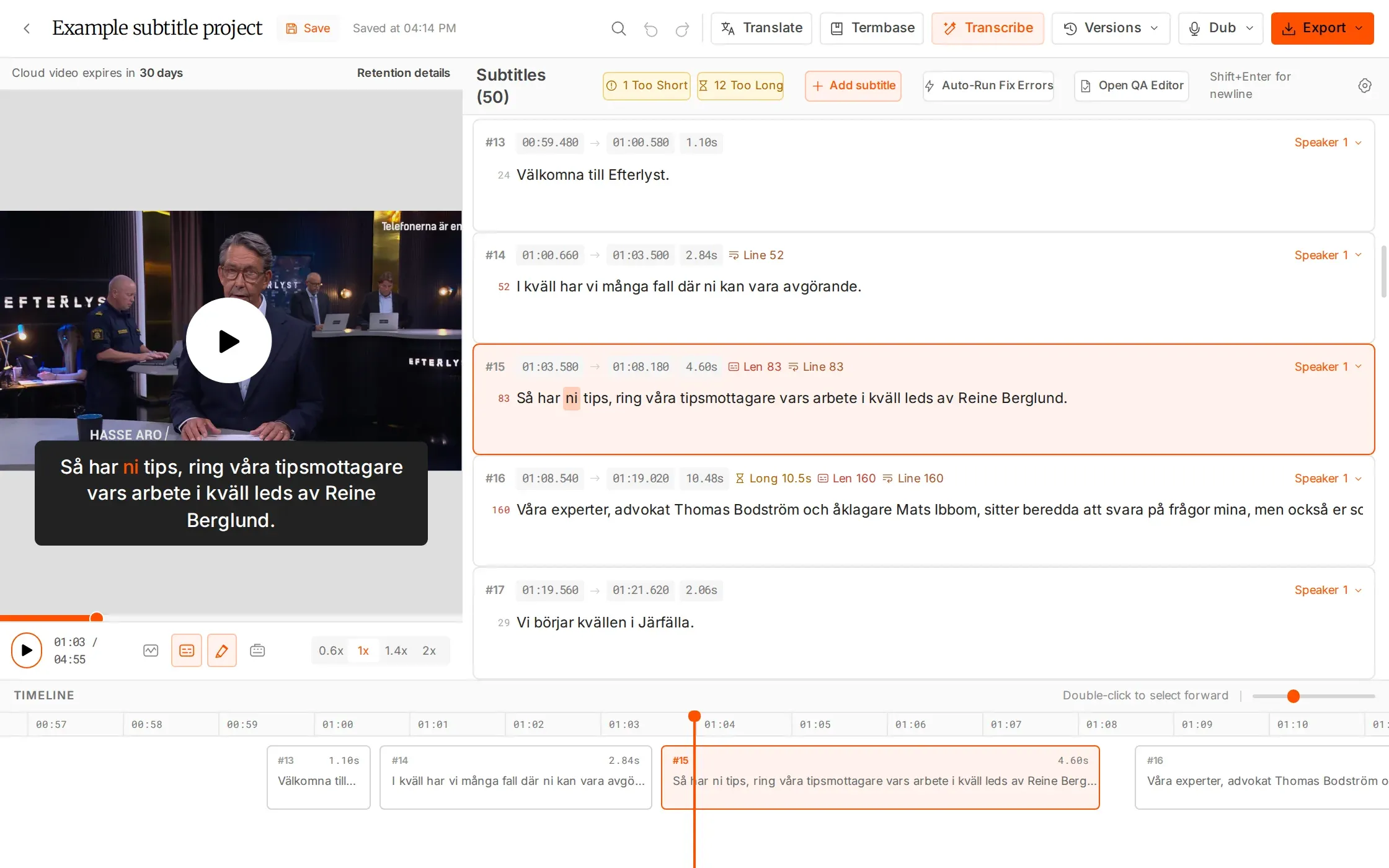
From first pass to delivery.
AI handles the starting point. Your specialists shape the result.
Keep the work together
Move between transcription, editing, translation, QC and dubbing without rebuilding the project.
Stay close to the picture
Check wording and timing against the video, then keep each language as a separate version.
Make delivery repeatable
Start with broadcast-style defaults: 37 characters per line, 2 lines and 20 characters per second. Adjust them to the brief.
WHAT YOU CAN DO
A complete subtitle job, from source to delivery.
Start from media or SRT
Upload video or audio for a timed first draft, or import the subtitles you already have. Add a project termbase for names and specialist vocabulary before transcription, so the review starts with useful context.
Edit language and timing together
Read captions on the video while you adjust wording, line breaks and timing in the editor. Use the waveform, playback controls and QC flags to work through the details without separating the text from the picture.
Give every language a clear owner
Keep translations as separate versions and assign the exact version to an external specialist. Set a deadline, task permissions and an AI allowance, then follow offered, accepted and finished status in the same project.
Review and export the right version
Share a specific version with a client for review or editing, with optional password protection and expiry. Once the work is ready, export SRT, WebVTT or EBU STL for the next stage of delivery.
HOW IT WORKS
One project. A clear path forward.
Start with source media or an SRT. Bring your team into the version that needs their attention.
Bring in the source
Upload video or audio, or import an SRT. Use project termbases to help transcription recognise specialist terms.
Refine with your specialists
Edit against the picture, create language versions and work through adjustable QC checks.
Review and deliver
Share a specific version for client review, then export SRT, WebVTT or EBU STL.
IN YOUR WORKFLOW
Built around the work your team delivers.
A recurring multilingual video series
Upload the next batch, create the source subtitles and translate into the required languages. Assign each version to the right specialist and bring the client into the version that needs review.
WHY IT HELPS
Keep the production queue, language work and review handoffs connected.
An existing subtitle file needs finishing
Import the SRT, check it against the video and correct the wording or timing. Run QC using the delivery limits, then share the revised version or export the requested subtitle format.
WHY IT HELPS
Keep usable source work and focus the team on what still needs attention.
Team workspaces have no seat limits. Editing, in-editor translation, QC, Re-split and export are free; AI Dubbing is billed separately.
FAQS
Have questions? Find answers.
Have more questions?
Reach out to our friendly support team
What is Subtitle Studio?
Subtitle Studio brings transcription, editing, QC, translation and dubbing together in a browser-based workspace.
Do I need to install anything?
No. clipsubs runs in the browser. The interface is currently available in English.
How is my editing saved?
The editor autosaves every 10 seconds and includes a crash backup.
Can I use existing subtitles?
Yes. Import an SRT as a new file or as another version in an existing project.
Which formats can I deliver?
Export subtitle files as SRT, WebVTT or EBU STL. clipsubs does not burn subtitles into video.
Does every action use AI hours?
Editing, QC, Re-split, export and translation inside the editor are free. Transcription, AI Resync and utility tools use hours. AI Dubbing is billed separately.
Make room for more finished work.
Try the studio with 30 free minutes. No card required.