PRODUCT / QC (QUALITY CONTROL)
Check every subtitle before delivery.
Give editors a clear technical review pass before a language version leaves the team. Set the subtitle limits, work through flagged issues and confirm the changes against the picture.

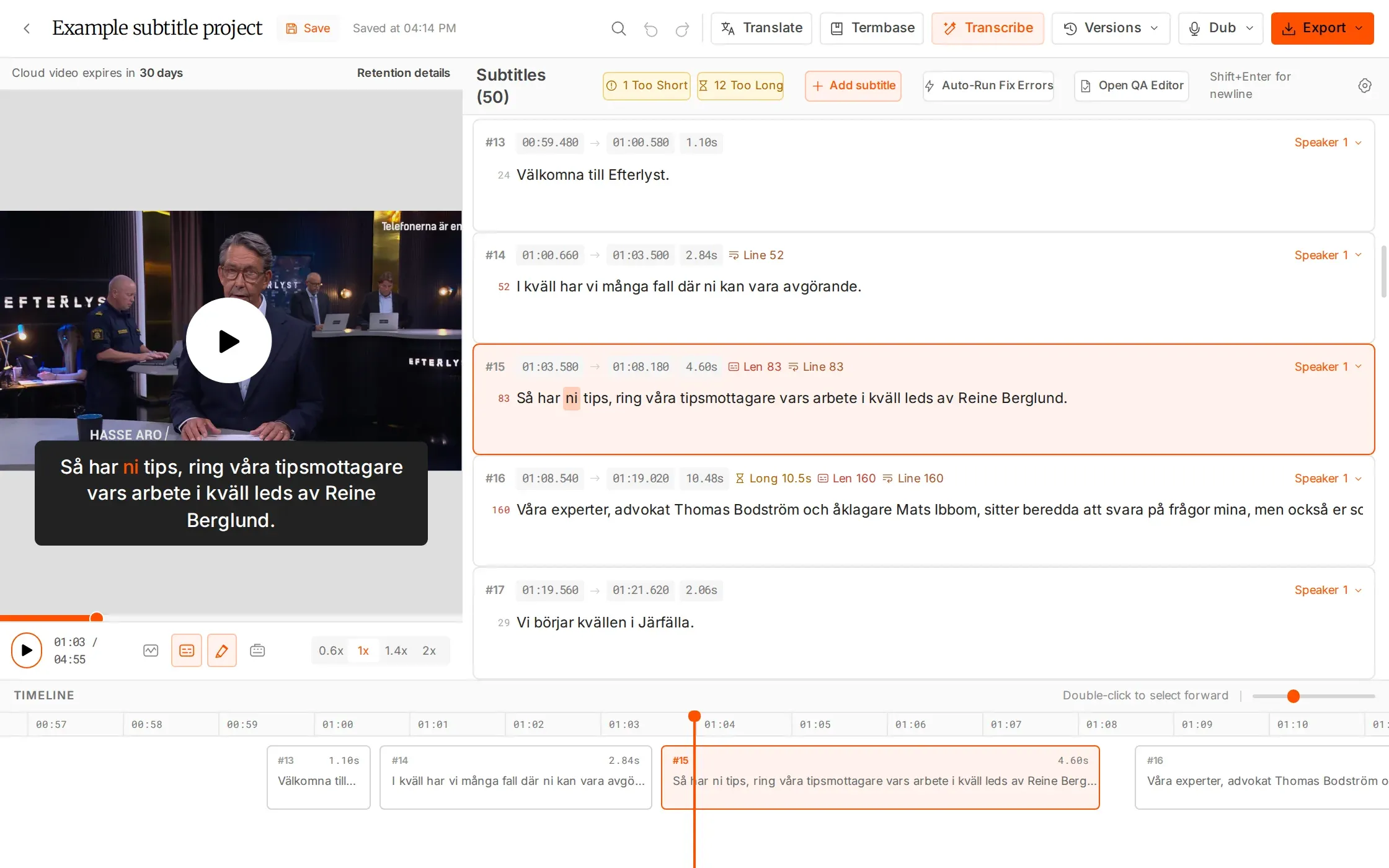
Repeatable checks. Human judgement.
Use the limits your delivery needs. Keep the final call with your team.
Set eight adjustable checks
Check duration, total length, line length, line count, reading speed, early starts and formatting.
Move straight to the issue
Detect overlaps and jump to the next issue. Use one-click auto-fix where appropriate, then review the result.
Check a batch together
Run bulk SRT QA on up to 30 files at once to check and fix a delivery batch.
WHAT YOU CAN DO
Turn the delivery brief into practical checks.
Set the thresholds for the job
Adjust eight checks covering short and long duration, total and per-line length, line count, reading speed, early starts and formatting. Use the client’s delivery requirements to guide the limits for the version you are reviewing.
Go straight to the subtitle that needs work
See overlaps and jump to the next flagged issue. Review the wording and timing alongside the video, so a technical flag leads directly to a decision about the subtitle instead of a separate list to track.
Apply a fix, then check the result
Use one-click auto-fix where it is appropriate, or make the change manually in the editor. Review the resulting timing and line structure before delivery; the flag helps focus attention, while the editor decides what works.
Check subtitle batches together
Bulk SRT QA can check and fix up to 30 files at once. Use it for a group of incoming files or a delivery batch, then review the results against the language and format requirements of the job.
HOW IT WORKS
Set the limits. Work through the flags.
Make technical review part of the production flow, not a separate file chase.
Choose the checks
Set limits for the job, including reading speed, line structure and duration.
Review flagged subtitles
Jump to each issue, check the picture and decide whether to edit or apply auto-fix.
Confirm the delivery version
Review the changes and export the format required for the next handoff.
IN YOUR WORKFLOW
Make technical review part of each handoff.
Several language versions are nearing delivery
Set the relevant limits and work through the flags in each version. Check long lines, reading speed and timing against the video, then confirm the corrected version before export.
WHY IT HELPS
Use a consistent technical review process across the release.
A batch arrives from external specialists
Run bulk SRT QA on up to 30 files, review the results and correct the remaining issues. Keep the final language and client-specification review with the team responsible for delivery.
WHY IT HELPS
Give the incoming batch a technical check before it moves to the next stage.
QC in the editor is free. Bulk utility processing uses 5 minutes per file. Technical checks support your team’s final language and delivery review.
FAQS
Have questions? Find answers.
Have more questions?
Reach out to our friendly support team
What does QC check?
QC has eight adjustable checks covering short and long duration, total and per-line length, line count, reading speed, early starts and formatting. It also detects overlaps.
Can I change the thresholds?
Yes. Adjust the checks to your requirements rather than relying on a single fixed profile.
Can clipsubs fix issues automatically?
One-click auto-fix is available. Review the result before delivery.
How many files can bulk SRT QA process?
Bulk SRT QA can check and fix up to 30 files at once.
Does QC guarantee an approved delivery?
No. Technical checks support review; your team still checks meaning, timing, accessibility and the client’s specification.
How is QC charged?
QC in the editor is free. Utility-tool processing, including bulk tools, uses 5 minutes per file.
Make quality control part of every handoff.
QC inside the editor is free. Bulk utilities use 5 minutes per file.