
The four-tool chain
For years, a subtitle job in our own production at Linearis ran across three or four separate tools. A transcription service produced the first draft. A desktop subtitle editor was where the specialist did the real work. A file-transfer or storage tool moved files between people. Email, and a spreadsheet somebody kept up to date, held the status of the job.
None of these tools was bad. Each did its own part well, and most teams in our industry will recognise the set. The trouble was never inside any one tool. It was in the gaps between them, where nobody owned the work and every step depended on a person remembering to pass something on.

- 01 / FILESProject
- 02 / HISTORYVersion
- 03 / VENDORAssign
- 04 / CLIENTShare
What every handoff costs
Every time work moved from one tool to the next, someone exported a file. Then they renamed it, because the next tool or the next person needed a different convention. Then they uploaded it somewhere and sent a message to say where it was. On a single file in a single language that is a few minutes. On a series with several languages, a few minutes becomes a large part of the week.
The bigger cost is context. A subtitle file on its own does not carry the brief, the reasons for a timing decision or the note the client left on the previous episode. When the file travels by email, that context stays behind in someone’s inbox. The next specialist starts from the file, not from the job.
Copies are the third cost. Once a file has been sent to three people, there are three versions of it, and sooner or later two of them are edited at the same time. Then someone spends an afternoon working out which changes belong in the delivery.
“Every export creates a copy, and every copy is a question about which one is current.”
Lauris Zemturis, founder of clipsubs
Seats, and a status nobody can see
Tools that are licensed per seat add another kind of friction. In our vendor network, the people who touch a job change from project to project. When a freelancer or a reviewer needs their own licence, the cheapest option is to send them a file instead, and the job goes straight back to email.
Status was the hardest part to see. To know where a job stood, a producer had to ask. Has the transcript come back? Has the German specialist started? Did the client open the file? The spreadsheet was only as current as the last person who remembered to update it, and the answer usually arrived after the question had stopped mattering.
None of this shows up as a line on an invoice. It shows up as producers chasing, specialists waiting and deadlines that slip for reasons nobody can point to afterwards.
One project holds the job
In clipsubs, the job lives in a project. A project holds several files, whether video, audio or imported SRT, along with the target languages, file-level progress and the termbase used for transcription. The project dashboard has Overview, Versions & Languages, Termbases and Sharing tabs, so the producer can see which languages are done and which files still need work without asking anyone.
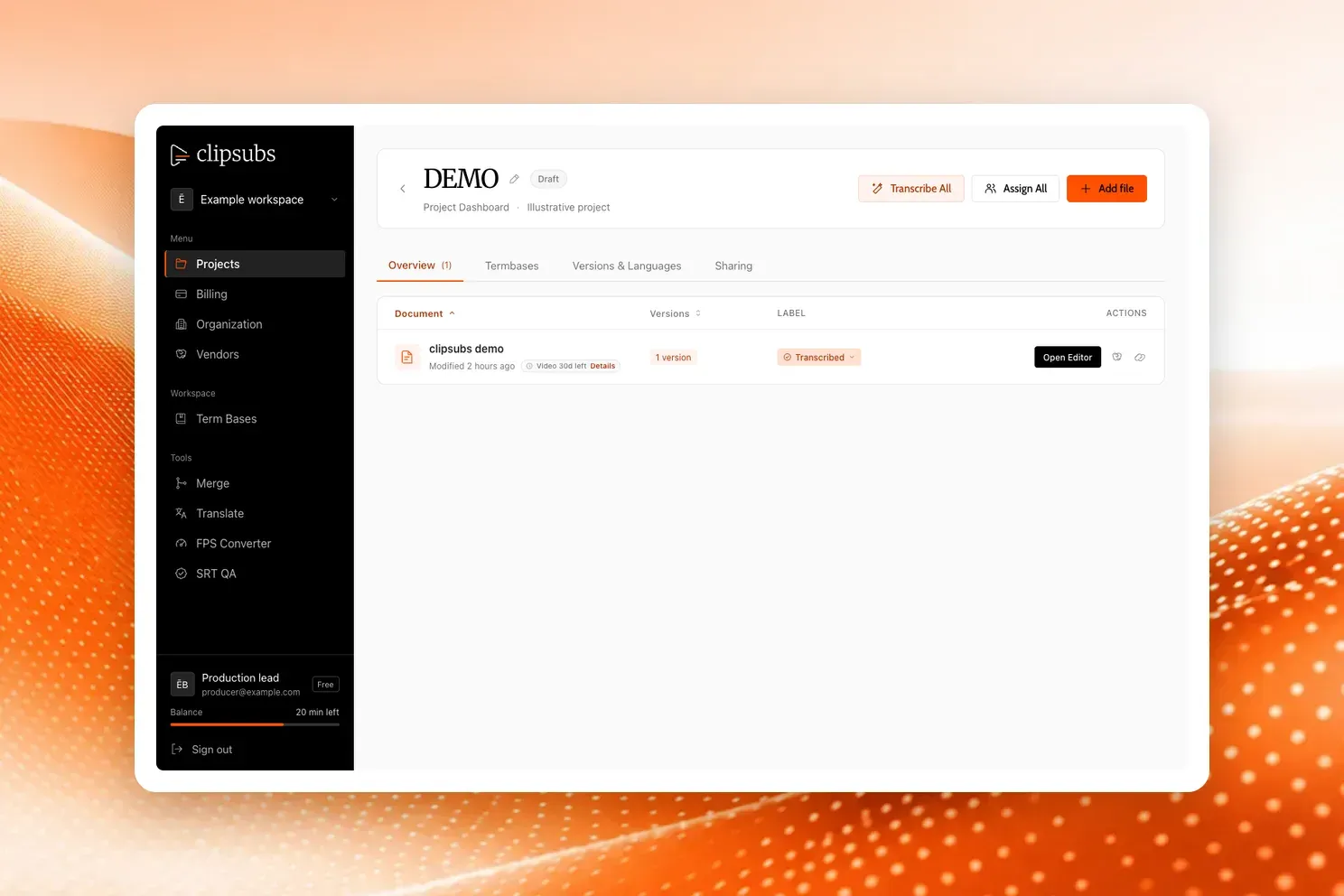
Transcription happens inside the project too. Transcribe one file or run Transcribe All on the batch; processing continues in the background, and an email arrives when a long file is ready. The draft opens in the editor next to the video, with no download, rename or import step in between.
The context that used to stay in someone’s inbox has a place as well. A project termbase holds the names, brands and specialist terms for the series, up to 100 terms per list, and every file in the project uses it for transcription. Specialists can add terms from the editor with a keyboard shortcut when they meet a new name, so the next episode starts with it already known. Termbases guide transcription; they are not applied to translation.
Each file shows its retention date. Videos are deleted after 30 days, while subtitle versions are kept, so the language work stays with the project even after the media has gone.
Versions instead of copies
Every step in clipsubs leaves a named version: transcription, translation, resync, re-split, QC, dubbing, vendor work and imports. Versions are grouped by language, with the latest marked and creation and edit times visible. Instead of a folder of files called final and final-2, there is one list per language, with a clear current version and the history behind it.
Collaboration works on the version, not on a copy of it. One person edits a version at a time while others watch the changes live, and another editor can take over when it is free. Save-conflict protection helps prevent overlapping edits from overwriting the work. Two people cannot quietly produce two different files, because there is only one version to work on.
“The point of a workspace is that there is only one place to look.”
Lauris Zemturis, founder of clipsubs
Assignments and review links
External specialists do not receive files. They receive an assignment: the exact language version, a deadline, a note, task permissions for import, auto-fix, translation and QC, and an AI allowance. The specialist accepts it and works in the vendor portal. The producer follows offered, accepted and finished status, with email notifications at each step, and a specialist can submit part of the work before the whole job is done. The allowance is 15 minutes by default, and a vendor can choose whether to use your organisation’s hours or their own.
Clients get a review link to the specific version that needs their attention. They can review and edit it without creating an account. The link can have a password and an expiry date, it can be revoked whenever it is no longer needed, and the Sharing tab shows whether it has been opened or edited. The client’s changes stay with the version they were sent, rather than coming back as another file to merge by hand.
Before you consolidate your tools
- Map one recent job from source file to delivery, tool by tool.
- Count the exports and renames between each tool.
- Note where status lived, and who had to be asked for it.
- List who touched the job and whether each of them needed a seat.
What stays outside, and what you pay for
Team workspaces in clipsubs have no seat limits. People are organised with Owner, Manager and Member roles, and everyone draws on a shared pool of AI hours, with a limit for each member where you want one. What you pay for is processing: transcription at 1× the source duration, AI Resync at 0.3× and utility tools at 5 minutes per file. Editing, in-editor translation, QC, Re-split and export are free, and Free covers your own subtitles with a one-time 30-minute AI trial.
We also kept the edges clear. Import is SRT, and export is SRT, WebVTT or EBU STL. clipsubs does not burn subtitles into video, and SRT Merge joins subtitle files, not video files. That is deliberate. A team can bring one workflow into the workspace and keep its existing video tools and delivery chain around it.
I would not suggest moving everything at once. Take one recurring job, run it through a single project, and count the messages your producer did not have to send. In our own work, that was where the case for one workspace became obvious.